Thursday, 24 January 2013

Running multiple instances of DVBStreamExplorer

When DVBStreamExplorer V3 is launched and another instance is already running one is  faced with message below.


This limitation has been removed in DVBStreamExplorer V4 which has just been released.
Below is a screenshot from a Windows desktop where two instances of DVBStreamExplorer are running. One instance is scanning DVB-T data from a Cinergy HTC USB XS DVB-T Tuner and the other is scanning DVB-S data from TBS5925 DVB-S2 TV Tuner USB.


As a convenience DVBStreamExplorer application window title bar now includes name of capture device.

Monday, 31 December 2012

Decoding user defined Nordig, DTG (D-Book) and IEC 62216 (E-Book) descriptors

Next version of DVBStreamExplorer will include the option to select which syntax to be used for decoding of user defined (0x80 - 0xFE) descriptors.
This is of special interest with regards to Logical Channel Number descriptors which are defined in each of the above standards except for EN 300 468. While the syntax is very similar in the standards, there are minor differences regarding the allocation of bits for each field.
The standard to be used for decoding can be selected in DVB PSI/SI / Multiple DVB-S/T/C MUX scanning window before starting scan operation. See screenshot below.


On SI scan completion you can switch to service view. A new 'lcn' column has been added. A value of -1 means that there was no LCN descriptor applicable for service. See screen shot below.


LCN information is also shown for each service found in MUX in DVB TS Monitor. Like for for SI scanning the syntax to be used for decoding has to be selected before starting scan operation. See screenshot below.


Finally LCN information has also been added as a new field to the CVS export of service information.

While LCN descriptor is probably the one of most interest, other user defined (0x80 - 0xFE) descriptors will also be decoded. You will find these in the various descriptor loops of decoded sections.

Follow +DVBStreamExplorer to keep up to date with DVBStreamExplorer related news.

Sunday, 25 November 2012

Export to folder after SI scan in DVBStreamExplorer

If you are using DVBStreamExplorer to scan entire DVB, ATSC or ISDB networks for PSI/SI/PSIP information, you might appreciate a new feature in DVBStreamExplorer Professional Edition V3.0.113 that allows you to have various files exported and saved automatically when PSI/SI/PSIP scan is completed. Note that this feature is only applicable for 'Multiple * MUX scanning' features found in PSI/SI/PSIP menu.

The new feature can be enabled from Options / Preferences / SI scan page as shown below.


Here you can enable/disable the feature, select destination folder and select which file types you want to export.
'Save SI XML' corresponds to File / Save/Save As file, which is a file type that can be loaded by DVBStreamExplorer for offline viewing of PSI/SI/PSIP information.
'Save service XML' and 'Save CSV' corresponds to options found in File / Export / XML and File / Export / CSV.
All files will be saved in specified folder. File name will be automatically generated based on network type, export type and date/time of export. The date/time part of file name is based on, but does not necessarily strictly conform to, ISO 8601. The time is specified in UTC to allow files to be easily exchanged between different time zones.


BDA tuner configuration in DVBStreamExplorer

DVBStreamExplorer V3.0.113 fixes a problem that it would fail to initialize some BDA devices on Windows 7. The old device selection box looked like below.


 In case of device initialization failure you would see a message like below when starting application.


While fixing this issue, it was found that the application was not always able to reliably detect BDA tuner configuration. I.e. it was possible that a DVB-T device could be detected as DVB-S device.

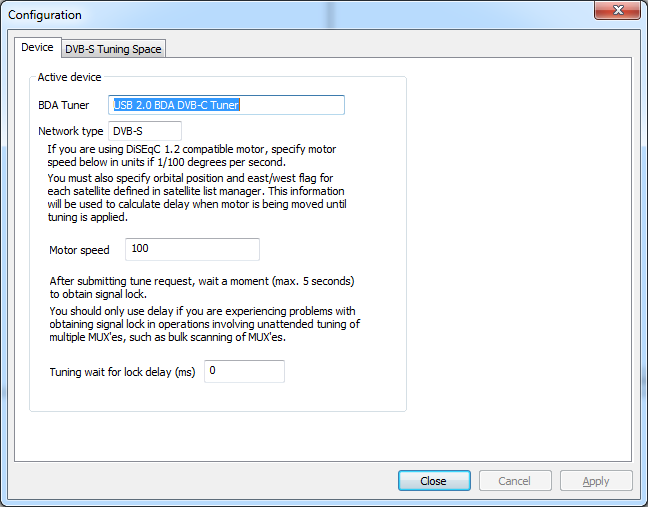
You can verify how your BDA tuner device was detected by application by opening Device / Settings page.
Below is a screenshot showing how a DVB-C  device was detected as DVB-S.


As a workaround a new feature has been added, so that it is now possible to specify network (tuner) type when selecting device during application launch.
The new device selection box is shown below.


You can select between auto detect, DVB-S, DVB-T, DVB-C and ATSC.
It is recommended to first try with auto detect. If then network type is not detected correctly by application, you will need to specify correct network type when launching application.
Note that application can only remember the last network type used. So if you change between different BDA device types, you will have to specify correct network type every time you launch application unless you are using auto detect option.


Sunday, 14 October 2012

DVBStreamExplorer export to Web Services

The next release of DVBStreamExplorer Professional edition will introduce new features for exporting data to Web Services.
  • Service WS export
  • EIT WS export
Service WS export
This feature will export the same data as when exporting to CSV file. The difference being that it will export directly to a server that implements a WS that can be consumed by DVBStreamExplorer.
This could be used by users who are using DVBStreamExplorer to produce data for an on-line DTV service list.
For information on how to develop a WS that can be consumed by DVBStreamExplorer visist http://developer.dvbstreamexplorer.com
The WS export is invoked from export menu.

Endpoint URL of Web Service has to be entered. There is also an ID field. The meaning of this is defined by WS implementation. It is not used internally by DVBStreamExplorer. This could for instance be a unique DTV service list instance, so that multiple DTV service lists could be hosted.

EIT WS export
This feature will export EIT event data to a Web Service. DVBStreamExplorer could then be used to provide event data for an on-line TV guide.
For information on how to develop a WS that can be consumed by DVBStreamExplorer visist http://developer.dvbstreamexplorer.com
This feature is part of the DVB TS Monitor EIT page.


Before starting TS Monitor session, export to WS must be configured. Configuration of EIT WS export can be invoked from Options -> Preferences EIT export tab.


Endpoint URL of Web Service has to be entered. There is also an ID field. The meaning of this is defined by WS implementation. It is not used internally by DVBStreamExplorer.
EIT module will cache events in memory. When a sufficient number of events have been cached they will be exported to Web Service. This will happen either when 'Upload interval (minutes)' has passed or count of events has exceeded 'Event threshold', depending on which of these two events occurs first.
A maximum number of 'Max events per request' events will be sent in one request to Web Service. If number of cached events exceeds this value multiple requests to Web Service will be made.


Thursday, 11 October 2012

Using Google Drive with DVBStreamExploerer exported CSV files

Service information files exported from DVBStreamExplorer in CSV format can be uploaded to Google Drive and converted to Google Spreadsheets. Service information can then be shared easily with other users and you can access information from everywhere including handheld and mobile devices.
You will need either a Google Account or a Google Apps Account.

Below is a DVBStreamExplorer scan of local DVB-T channels (Malta) exported to Google Docs spreadsheet.


Direct link to spreadsheet: https://docs.google.com/spreadsheet/ccc?key=0AlzKD8F--RuTdDJpUWlRYXF3WFpiT3pRdUxRWFgxUUE

Below is a DVBStreamExplorer scan of 'Astra 19.2°E' exported to Google Docs spreadsheet.


Direct link to spreadsheet: https://docs.google.com/spreadsheet/ccc?key=0AlzKD8F--RuTdHhqcVJNWmdTRDVoNVdhM1ZESWphLXc

Once service CSV file has been converted to spreadsheet one could apply Google Apps Script to add special features. This could for instance be extraction of certain information which would normally be difficult to spot when looking at a large spreadsheet. Or it could be used to spot service changes over time. For instance if 'Astra 19.2°E' was scanned one day and then scanned again a week after a script could generate a report of service changes. Such a report could include added and removed services, and list of services where one or more properties changed.

Follow +DVBStreamExplorer to keep up to date with DVBStreamExplorer  related news.

Wednesday, 10 October 2012

NorDig support in DVBStreamExplorer

The next release of DVBStreamExplorer will introduce decoding of NorDig logic_channel_descriptor and content_protection_descriptor private descriptors.
This might be of interest to users in Nordic region (Denmark, Finland, Iceland, Norway, Sweden) and Éire.
For logic_channel_descriptor, both Version 1 (descriptor_tag 0x83) and Version 2 (descriptor_tag 0x87) are decoded.
Below is a screenshot of logic_channel_descriptor (Version 1) decoding in DVB PSI/SI scanning.


And below is screenshot of decoding of same descriptor in DVB Transport Stream Monitor.